Log a flight
Enter a flight by hand — times, aircraft, crew, launch, tow and who pays.
Most flights are recorded by the tracking automatically. Log a flight by hand only when it is not already in the Flight Log — for example an aircraft without a tracker, or a flight from another airfield. Check the day first, so the flight isn’t entered twice.
Open the form
In the Flight Log, press the round + button (Log flight) in the bottom-right corner.
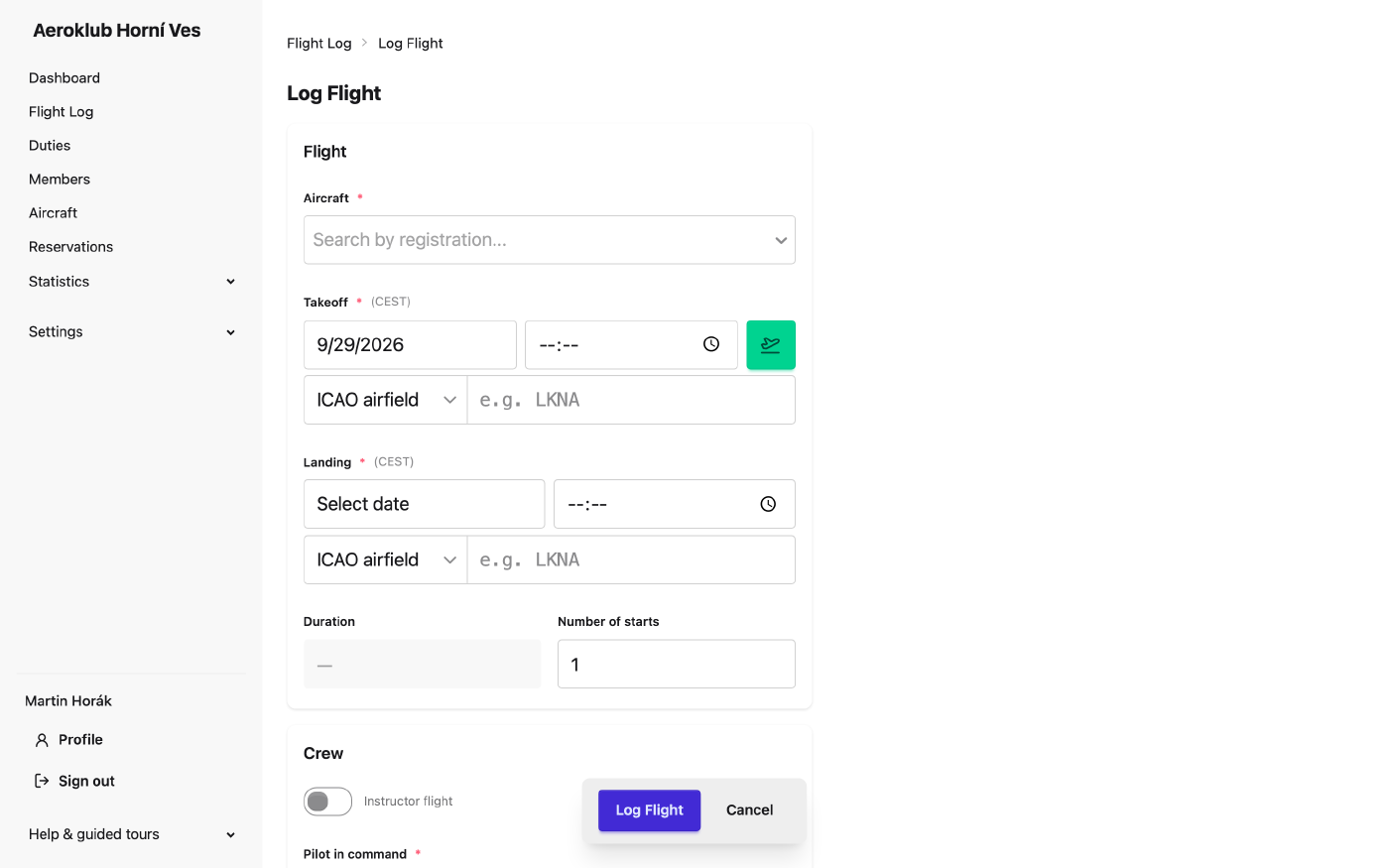
Fill it in
The form is the same one used to complete and to edit a flight, with the fields in this order:
- Aircraft — type the registration and pick it from the list.
- Start type (gliders) — Aerotow, Winch or Self-launch.
- Takeoff and Landing — the date and time in club time, and where: an ICAO airfield, or Other place with a name and coordinates (an outlanding in a field). While the takeoff is empty, the button next to it sets it to now; once the aircraft is in the air, the same button appears for the landing. You can save a flight that hasn’t landed yet and add the landing later.
- Duration is calculated from takeoff and landing — you don’t type it. Number of starts is 1 unless it was a series of touch-and-goes.
- Crew — the Pilot in command and, on a two-seater, the Second pilot. For a training flight switch on Instructor flight: the fields become Pilot / Student and Instructor.
- Cost Sharing — who pays (see below).
- Task — what the flight was for (circuits, cross-country, check flight…). Only tasks that fit the aircraft are offered.
- Description — an optional note, for example the route of a cross-country.
- Press Log Flight.
The flight is saved to the Flight Log. If everything approval needs is there it shows as Ready to Approve; otherwise as Missing Data with the missing field named.
Aerotow: the tow flight
When the start type is Aerotow, a Tow flight section appears. Choose one of three modes:
- Use existing — the tow is already in the Flight Log (usually detected by tracking). Pick it from the list; tows that took off close to the glider are offered, the most likely one marked Suggested.
- Create new — enter the tow aircraft, the tow pilot and the tow’s landing. The tow flight is created together with yours, taking off at the same time.
- Don’t record — the tow isn’t tracked here (for example it was paid for separately).
A badge next to the choice says what saving will do: Links on save, Unlinks on save or Creates on save. Switching modes doesn’t lose what you typed.
The tow’s cost is charged to whoever pays for the glider flight, not to the tow pilot. Linking the tow is what makes that happen.
If you are logging the tow itself, switch on Mark as tow and link the glider in the same way.
Who pays: cost sharing
By default the pilot in command pays 100 %. Cost Sharing changes that:
- Adding a second pilot adds them as a payer with 0 % — raise it to share the cost, or press Split evenly.
- Add payer adds anyone else who pays for the flight.
- The shares always add up to 100 %: the share you type is kept and the other payers take the rest. With two payers, typing 60 sets the other to 40.
On an instructor flight the student pays everything by default; the instructor pays nothing and may receive an instructor reward.
Billing → No charge is for flights the club doesn’t bill — a check flight, a test flight after maintenance, a demonstration. The charges are still calculated and kept for the record, but nothing is posted to anyone’s account. Somebody else must approve such a flight: not the person who switched it on, and nobody who flew it or pays for it.
Warnings before saving
Some values are not impossible, only unlikely. Instead of refusing them, the form explains and asks you to confirm — the panel Check this before saving appears and you press Save anyway:
- a flight longer than 24 hours,
- a takeoff or landing in the future,
- a landing at exactly the takeoff time,
- a pilot who is already on another flight at the same time. The warning names that flight and links to it, so you can fix the wrong one. You can save now; the conflict must be resolved before either flight is approved,
- an aircraft that is already on another flight at the same time.
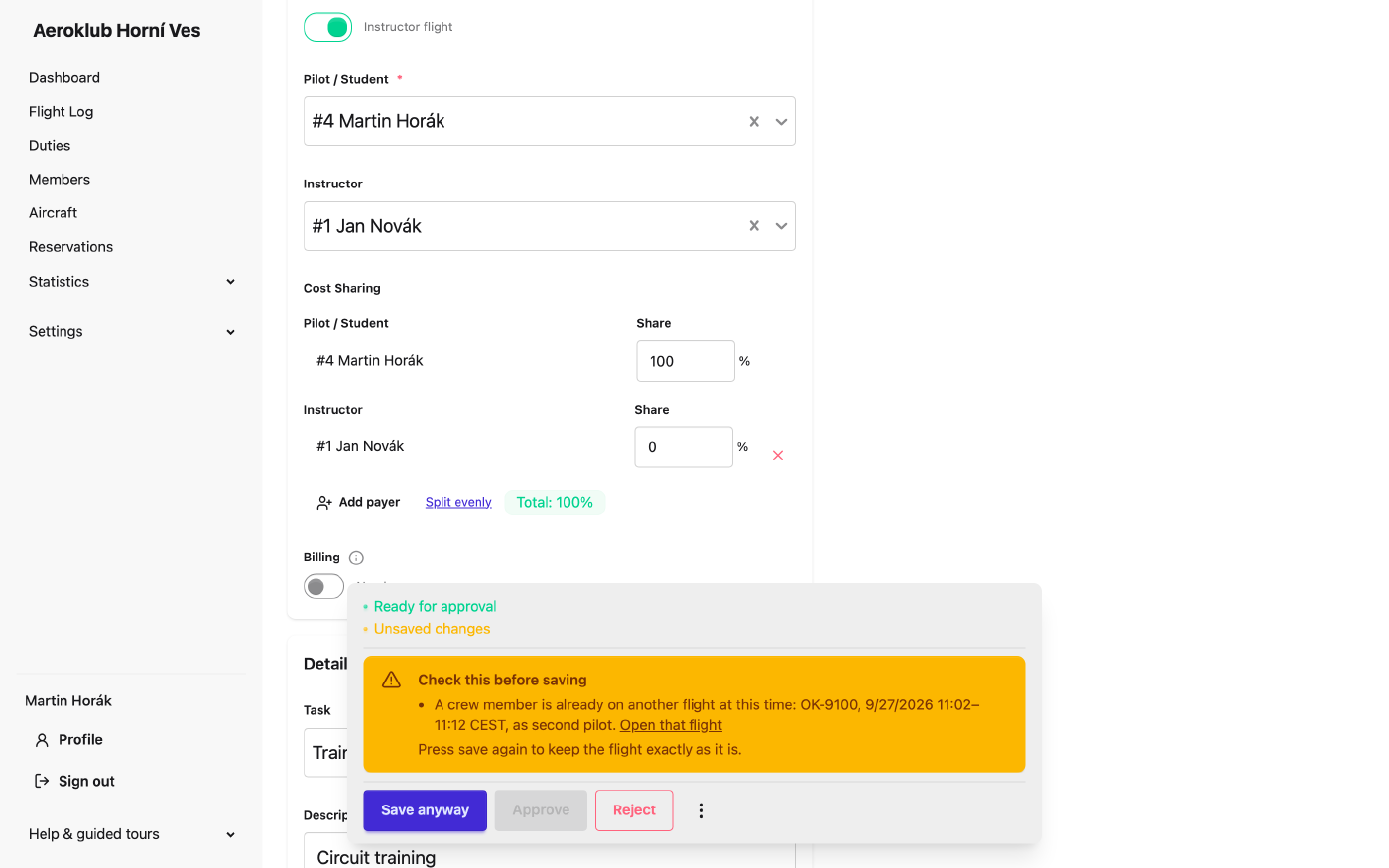
Truly impossible combinations are refused with a message on the field: a landing before the takeoff, the same person in both seats, a second pilot on a single-seater, a tow pilot on a winch launch and similar.
Leaving the form
If you navigate away with unsaved changes, the app asks first. Choose Leave page to throw the changes away, or stay and save them.